HOW TO ADD AUDIO TO A VIDEO FILE
With Machete, you can add an audio to a video file, or replace an existing audio stream (track) with a new one. Machete adds an audio stream to an entire video file starting at the beginning (from zero (0) position) regardless of any current playback position set within a file. With Machete, you can add up to four audio streams to one file, except in FLV files which cannot contain more than one audio stream.
Step 1. To add an audio to a file, you need to prepare the initial video file first. If this file already contains an audio stream, you need to delete it. For this, use menu File-> Save video stream as... to separate the video stream and save it as a new video file. After that, you can open the resulting file and edit it as necessary (e.g. cut out fragments that you do not need).
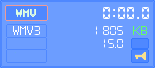
! Check that your file does not contain an audio stream: in this case, the LED panel displays no information about an audio stream format (see picture on the left).
Step 2. Prepare the audio file that you want to add as an audio stream (track) to your video file. Remember, this should be a WMA, MP4, 3GP, FLV etc audio file (depending on the original format of your video file). Audio files in MP3 format can be added to AVI, MP4, MKV, WMV and FLV video files. For example, you can utilize audio streams from other video files. To make an audio file from the audio stream of a video file, open a MP4, FLV, WMV, 3GP etc video file with the audio stream you want to extract in Machete and use menu File-> Save audio stream as... to separate the audio stream and save it as a new audio file.

To make an audio file from the audio stream of a video file, open an MP4, WMV or FLV video file with the audio stream you want to extract in Machete and use menu File-> Save audio stream as... to separate the audio stream and save it as a new audio file.
Step 3. Open the video file prepared in Step 1 and go to menu File-> Add audio stream... Select the audio file prepared in Step 2 from the list and press Open. The resulting file will be saved under the name of original file automatically.
Alternatively, you can select an AVI, MKV, WebM, MP4, 3GP, MOV, WMV or FLV file that contains the required audio stream (depending on the original format of your video files). In this case, Machete will extract the audio stream from this file and add it to the initial video file.
! Please note that the menu Add audio stream... may be unavailable if the opened video file already contains an audio stream or it has not been saved after editing.
Note:
When adding an audio to a video file, make sure that their lengths are approximately the same. If they differ, you would need to edit the video and/or audio streams with Machete beforehand (for example, deleting unnecessary fragments) in order to make their lengths equal.
! Otherwise, Machete will trim the longer stream (either audio or video) while it is replacing the audio stream. The trimmed part will be discarded.